Wired Gaming Headset Mic Guide: Clear Chat & Setup
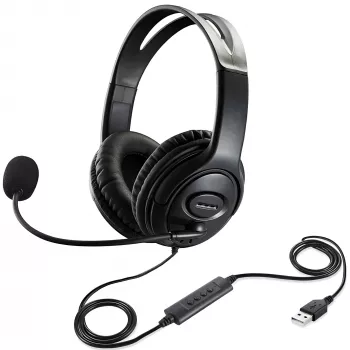
Wired Gaming Headset with Microphone: Clear Chat, Reliable Audio, and Simple Setup
A wired gaming headset with microphone is a straightforward way to get stable audio and clear voice chat without worrying about battery life, wireless dropouts, or pairing issues. The right pick depends on comfort for long sessions, microphone clarity, platform compatibility, and the type of connection (3.5 mm, USB, or split audio/mic).
What a Wired Gaming Headset Does Well
Wired headsets are popular for one simple reason: they’re predictable. When you plug in a headset and it works the same way every time, it’s easier to focus on the match instead of troubleshooting.
- Consistent connection: fewer interruptions compared with wireless links in crowded environments.
- No charging required: plug in and play for long sessions.
- Lower latency potential: direct connection can reduce audio delay for timing-sensitive games.
- Simple controls: inline volume/mute controls are common and quick to reach.
- Wide compatibility: many models work across PCs, consoles, and mobile devices depending on the connector.
Quick Compatibility Check (Before Buying)
Most “it doesn’t work” moments happen because a headset plug doesn’t match the device port. Take a minute to confirm what your platform actually accepts—especially if you switch between a console controller and a desktop PC.
- Connector type: confirm whether the device needs 3.5 mm (TRRS), dual 3.5 mm (separate audio/mic), or USB.
- Console controllers: many support a single 3.5 mm TRRS headset plug; older controllers may require an adapter.
- PC ports: desktops often have separate headphone and microphone jacks; laptops more often use a single combined jack.
- Mobile/tablet: a single 3.5 mm TRRS or USB-C adapter may be required depending on the device.
- RGB/software features: typically USB-powered and may be PC-only.
| Connection | Typical Devices | Notes to Confirm |
|---|---|---|
| 3.5 mm TRRS (single plug) | Controllers, laptops, phones (with jack) | Carries audio + mic on one plug; may need adapter for some PCs |
| Dual 3.5 mm (audio + mic split) | Desktop PCs | Often includes a splitter; check if your device has separate ports |
| USB-A / USB-C | PCs, some consoles | May enable extra features; mic monitoring and controls vary by model |
If you run into platform-specific audio settings, the official support pages are often the fastest way to verify the right toggles and device selections: Xbox Support, PlayStation Support, and Microsoft Windows audio help.
Microphone Quality: What Matters for Team Chat
A headset mic doesn’t need to sound like a studio broadcast to be useful, but it does need to be intelligible under pressure. The best gains usually come from physical setup rather than complicated software.
- Mic type: boom mics are usually closer to the mouth and can improve clarity compared with inline mics.
- Mute access: a physical mute switch is helpful for quick privacy.
- Background noise control: some headsets rely on mic placement, others use software processing (more common on PC).
- Monitoring (sidetone): hearing a bit of your own voice can prevent shouting; availability varies.
- Positioning: a flexible boom makes it easier to keep consistent distance for stable volume.
For clearer comms, aim the mic slightly off-center (near the corner of your mouth). This reduces “puffs” from breath while keeping your voice level consistent.
Comfort and Build for Long Sessions
Even great audio can’t save a headset that feels uncomfortable after 45 minutes. Comfort is a combination of fit, materials, and small details that prevent fatigue.
- Clamp force: too tight causes fatigue; too loose can break the seal and reduce bass and isolation.
- Ear pads: breathable fabric can feel cooler; leatherette can isolate better but may run warmer.
- Headband padding: spreads weight across the top of the head.
- Weight and balance: lighter headsets can reduce pressure over time.
- Cable durability: look for strain relief and a length that suits desk or couch play.
Setting Up for the Best Sound (Fast Checklist)
Product Spotlight: Wired Gaming Headset with Microphone
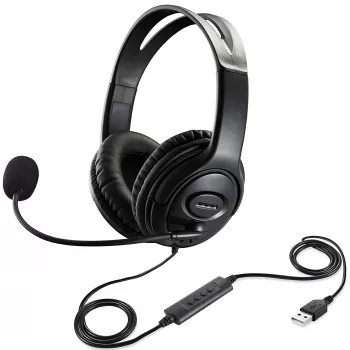
If you want an affordable, no-fuss option for game audio and team chat, the Wired Gaming Headset with Microphone keeps the focus on simple plug-in use. It’s a practical pick for everyday gaming where stable sound and quick mute access matter more than charging schedules.
| Item | Details |
|---|---|
| Name | Wired Gaming Headset with Microphone |
| Price | 16.51 USD |
| Stock status | In stock |
| Product page | View product |
Small Add-On That Helps: Store Adapters and Cables
The Embroidery Daisy Pencil Case Large Capacity School Supplies Pouch can double as a simple storage spot for headset cables, splitters, and spare earbuds—especially handy if you carry your setup between rooms or travel.
FAQ
Will a wired gaming headset with microphone work on both PC and console?
It depends on the connector and your ports: a single 3.5 mm TRRS plug often works with console controllers and many laptops, while desktop PCs may require dual audio/mic jacks or a splitter. USB headsets can be PC-friendly but may not support all console features, so check your device inputs and audio settings.
Why is my mic quiet or not detected after plugging it in?
Common fixes include selecting the correct input device in your system or game settings, confirming privacy permissions on PC, and making sure you’re using the right jack (or splitter) for microphones. Also verify any inline mute switch is off and raise mic gain/input level until your voice is clear without distortion.
Is wired better than wireless for gaming voice chat?
Wired is often simpler and more stable: no charging, fewer pairing steps, and less chance of interference. Wireless adds freedom of movement, but it can introduce battery management and occasional connection hiccups, so the better choice depends on where and how you play.


Leave a comment