Kids Instant Print Camera: Screen-Light Photo Fun
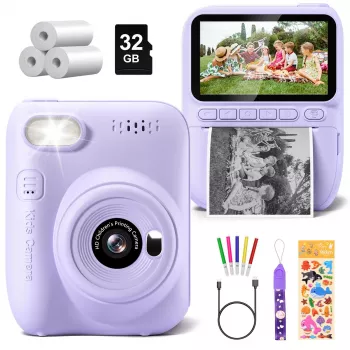
Kids Instant Print Camera: A Screen-Light Way to Capture and Share Moments
A kids instant print camera turns everyday adventures into tangible keepsakes in seconds. With a child-friendly design and simple controls, it encourages creativity, storytelling, and hands-on play—without needing a phone or a separate printer. For families looking to balance digital life with more “real-world” play, it’s a refreshingly direct way for kids to make, hold, and share memories.
What Makes an Instant Print Camera Different for Kids
An instant print camera combines two steps—taking a photo and printing it—into one quick moment. Kids press the shutter, and a physical print comes out right away, turning “I took a picture” into “I made something” within seconds.
That simplicity is a big reason parents like instant-print models for children. Instead of transferring files to a phone, syncing to an app, or finding a separate printer, kids can create a print on the spot with fewer steps and fewer opportunities to get stuck.
Many kids instant print cameras use roll-style refills that print using a thermal-style process. Practically, that often means faster printing and less mess—no ink cartridges to replace and no wet ink to smudge while kids excitedly pass photos around. The trade-off is that these prints are made for fun, crafts, and memory-making rather than studio-grade photo quality. Think “playful and shareable” more than “frame-worthy enlargement.”
Kids Instant Print Camera: Quick Look at the Product
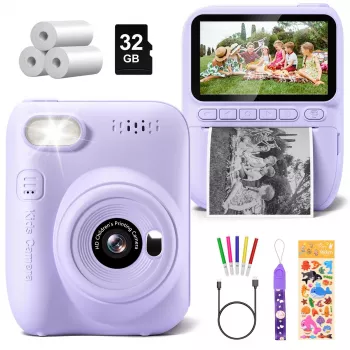
Kids Instant Print Camera is a simple gifting win because it combines photo-taking and instant sharing in one device. It’s especially handy for birthdays, playdates, family trips, and creative activities like scrapbooks, sticker books, and journals. The current listed price is $45.51 USD (check the product page for up-to-date pricing and availability).
For parents, the biggest day-to-day benefit is momentum: kids can stay engaged because they don’t have to wait for a grown-up to “send it to the printer.” For kids, the best part is immediate ownership—each print feels like a tiny finished project.
At-a-glance checklist for parents
| Category | What to confirm before buying | Why it matters for kids |
|---|---|---|
| Printing | Type of paper/refills and how many prints per roll | Refills affect ongoing cost and how often printing can happen |
| Controls | Large buttons, simple menus, easy-to-hold grip | Kids can use it without constant help |
| Durability | Shock resistance, lanyard/strap option, sturdy body | Reduces damage from drops |
| Power | Charging method and typical run time | Avoids mid-outing shutdowns |
| Storage | Whether it supports a memory card and file saving | Keeps digital copies even when printing less |
| Safety | No sharp edges, safe materials, child-appropriate design | More peace of mind for younger users |
How Kids Use It: Fun Ideas Beyond Single Prints
Instant prints are even more fun when they become part of a bigger activity. A few low-prep ideas that work well for different ages:
- Photo scavenger hunt: Make a list (something round, something green, something that makes noise). Kids print each “found” item and paste it into a mini booklet.
- Memory wall: Clip prints to a string line in a bedroom or playroom. It’s an easy way to display moments without screens.
- Story cards: Kids print a few pictures, then write a sentence on the back of each to create a short story (great for reluctant writers).
- Gift tags and notes: Add a printed photo to thank-you cards after parties, or attach one as a gift tag for grandparents.
- Travel log: One printed photo per day with a quick caption. This keeps journaling doable, even on busy trips.
What to Look For When Choosing One for Your Child
Not every camera fits every kid. A few practical features make a big difference in how often it actually gets used:
Setup and Day-to-Day Tips for Fewer Frustrations
Care, Safety, and Parent Notes
- Supervise younger kids with paper loading: This prevents crumpling, misfeeds, and the “I pulled it out halfway” problem.
- Watch small accessories: If any small parts are included, keep them out of reach of toddlers.
- Clean gently: Wipe the exterior with a soft cloth and avoid liquids near openings or slots.
- Talk about privacy early: Encourage kids to ask before taking someone’s picture and avoid printing personal details. For additional guidance, see the FTC’s information on children’s privacy (COPPA guidance).
Families also appreciate that a screen-light activity can complement healthier media habits. The American Academy of Pediatrics shares practical family resources on media and children here: HealthyChildren.org — Media and Children.
When It Makes a Great Gift
More in-stock picks from our shop
- Kids Instant Print Camera — instant photos for crafts, travel logs, and easy sharing.
- Powerful Cordless Air Duster — helpful for cleaning crumbs and dust from craft areas and hard-to-reach nooks around the house.
- PowerSpeed Lightweight Bagless Upright Vacuum Cleaner — a practical pick for quick cleanups after playdates, parties, and projects.
FAQ
Does an instant print camera need a phone or Wi‑Fi to work?
No. Most kids instant print cameras are stand-alone devices that can take and print photos without a phone or Wi‑Fi, though some models may offer optional connections for extra features.
What kind of paper does a kids instant print camera use?
Many kids instant print cameras use roll-style paper refills, often using a thermal-style printing method. Check the specific refill type recommended for the camera and confirm refills are easy to purchase.
Are the prints meant to last?
They’re designed mainly for fun, crafts, and everyday memory-keeping. For better longevity, store prints away from heat and direct sunlight, and save digital copies when possible.





Leave a comment