Mesh Office Chair with Lumbar Support & Flip-Up Arms
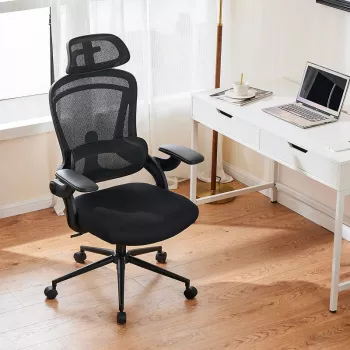
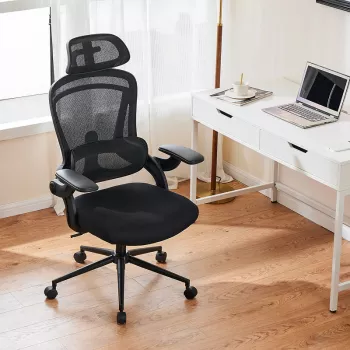
Ergonomic Mesh Office Chair Comfort for Real Workdays
Comfortable seating matters when workdays stretch long. The Ergonomic Mesh Office Chair with Lumbar Support and Flip-Up Arms is built around three practical ideas: a breathable mesh back to help reduce heat buildup, a lumbar-friendly back shape to encourage a more neutral posture, and flip-up arms that let you choose between forearm support and extra desk clearance. For compact home offices, shared rooms, or desks that aren’t perfectly sized, this style of chair can make everyday computer time feel noticeably easier.
What makes this chair feel supportive day to day
- Mesh back promotes airflow: Mesh helps air move through the backrest so you’re less likely to feel overheated during long sitting sessions.
- Lumbar support encourages a neutral lower-back position: A defined lumbar area aims to meet the natural curve of the lower spine, which can help reduce the “slouch and strain” pattern that shows up during typing or mousing.
- Flip-up arms add flexibility: Keep the arms down for steady forearm support, or flip them up to get closer to the desk edge when you want more room for your elbows and shoulders.
- Balanced, everyday comfort: A straightforward ergonomic upgrade for work, study, and general computer use—especially when you want breathable support without stepping into premium pricing.
Flip-up arms: when they help most
Arms that move out of the way can be more than a convenience; they can change how well a chair fits your desk and your routine.
- Space-saving in tight rooms: Flipping the arms up often makes it easier to slide the chair under many desks, helping reduce visual clutter in small areas.
- Smoother task switching: Arms down can feel better for keyboard-heavy work, while arms up can help with activities that need extra elbow room (drawing tablet use, instrument practice, crafting, or paperwork that spreads out).
- Easier entry and exit: In narrow spaces, flipped-up arms can reduce the “squeeze” factor when sitting down or standing up.
- Better fit across different users: If desk height can’t be changed, adjustable arm positioning can help minimize shoulder shrugging by letting you pick the position that keeps shoulders more relaxed.
Lumbar support and back comfort: practical setup tips
Even a good chair performs best with a few quick posture checks. These small habits help the lumbar zone do its job instead of becoming something you “fight” all day.
- Sit all the way back: Avoid perching on the seat edge. Let your lower back make contact with the lumbar area so your spine stays supported rather than hovering.
- Keep feet flat: Feet planted on the floor (or a footrest) can reduce pressure on the lower back and help prevent the thighs from taking too much load at the seat edge.
- Choose the arm position that keeps shoulders down: Aim for elbows close to the body and wrists in a neutral line while typing. If armrests make you lift your shoulders, flip them up and rely on the desk surface for support.
- Take short posture breaks: Stand, walk, or gently stretch every 30–60 minutes to reduce stiffness and keep circulation moving.
For additional workstation posture guidance, see OSHA’s recommendations on good working positions and the Mayo Clinic’s overview of office ergonomics.
Feature overview at a glance
| Consideration | This mesh chair with lumbar support + flip-up arms | Basic padded chair (typical entry-level) |
|---|---|---|
| Back breathability | Airflow through mesh to reduce heat | Often warmer due to solid padding |
| Lower-back support | Lumbar-supportive back design to encourage neutral posture | May lack defined lumbar contour |
| Arm flexibility | Flip-up arms for desk clearance and flexible positioning | Fixed arms can limit fit and desk clearance |
| Small-space convenience | Arms up can help slide under desks more easily | May not tuck in as neatly |
Who this chair fits best
For students building a compact desk setup, pairing an ergonomic seating upgrade with simple organization can help keep the workspace calmer. A small add-on like the Embroidery Daisy Pencil Case Large Capacity School Supplies Pouch is an easy way to keep pens, chargers, and small tools from piling up around the keyboard area.
Care, upkeep, and getting the most from mesh seating
For a deeper look at preventing aches from repetitive work and prolonged sitting, NIOSH provides an accessible overview of ergonomics and musculoskeletal disorders.
Price and availability
The Ergonomic Mesh Office Chair with Lumbar Support and Flip-Up Arms is currently listed at $107.47 (USD) and is in stock. It lands in a solid value range for shoppers who want lumbar-friendly comfort, mesh breathability, and the everyday convenience of flip-up arms.
If the goal is an overall “feel better at your desk” refresh, small routine upgrades can complement a better chair. The Rechargeable Sonic Electric Toothbrush with USB Charging & Replacement Heads is another in-stock option often chosen for simple day-to-day convenience—useful when busy schedules make consistency harder.
FAQ
Are flip-up arms comfortable for long typing sessions?
They can be, especially with the arms down supporting your forearms so your shoulders stay relaxed. If the armrests push you too high or force shoulder shrugging due to desk height, flipping them up and moving closer to the desk edge may feel better.
Does a mesh back provide enough support compared to a padded back?
Mesh can be very supportive when it’s properly tensioned and paired with a lumbar-supportive back shape. It also improves airflow, which many people prefer during longer sessions—support still depends on sitting fully back and keeping a neutral spine.
How should the lumbar area line up with the lower back?
Align the lumbar area with the natural inward curve of the lower spine (often slightly above the beltline), then sit fully back so it makes consistent contact. Keeping feet flat and the screen near eye level helps maintain that alignment.


Leave a comment